How to Create AI Manga from a Story
 Camika
Many creators have a story, novel, script, or character idea, but they get stuck at the same point: how do you turn written words into manga pages?
Creating AI manga from a story is not just about typing a prompt and generating one manga-style image. A real manga needs story structure, character consistency, scene planning, panel flow, dialogue, and readable comic pages.
The most useful workflow is:
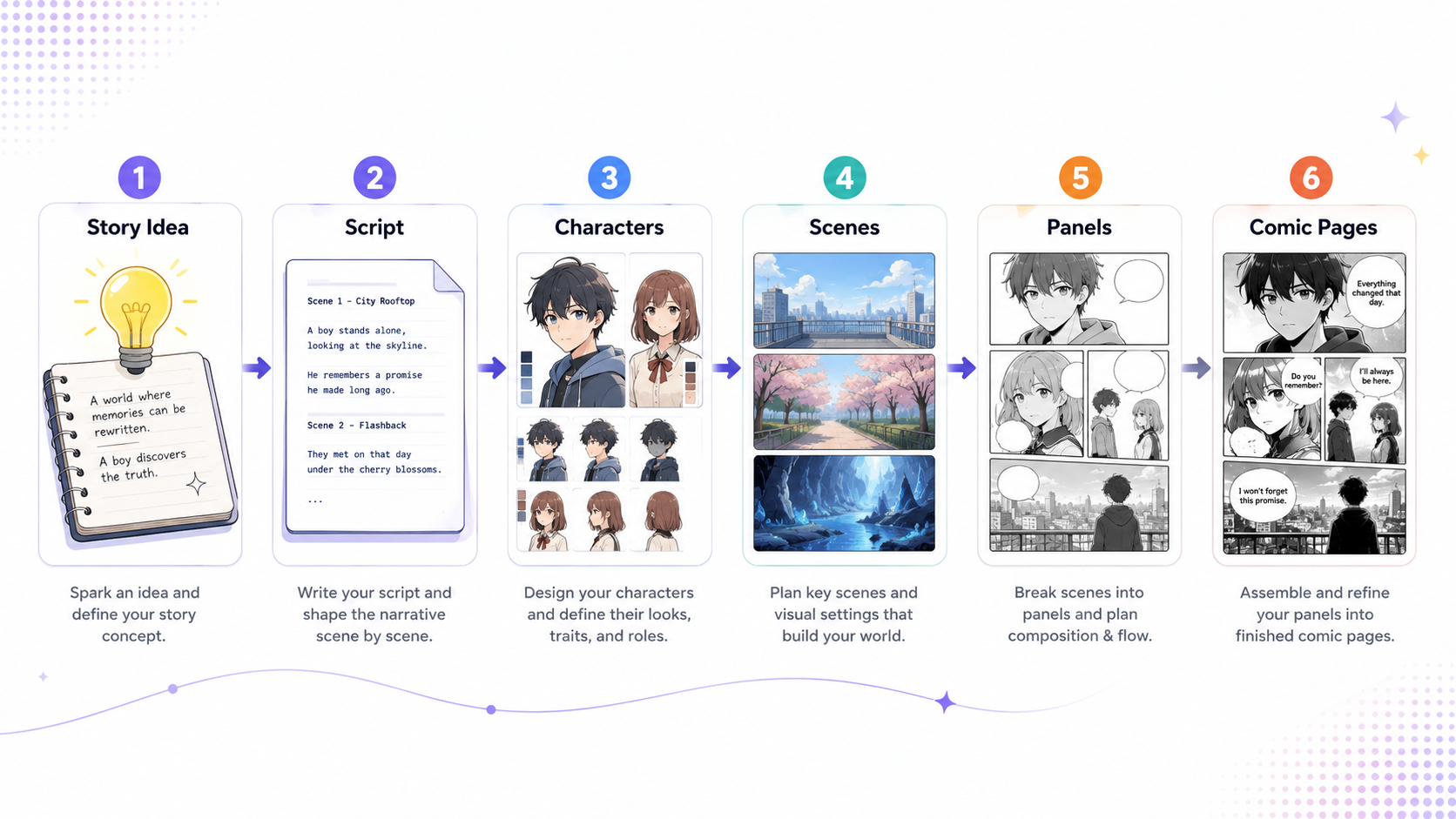
Story idea → Script → Characters → Scenes → Panels → Comic pages
This guide explains how to move from a written story to AI manga step by step.
What Does It Mean to Create AI Manga from a Story?
Creating AI manga from a story means transforming written ideas into sequential visual storytelling. Instead of creating one standalone illustration, you are building a visual narrative with characters, scenes, panels, dialogue, and page flow.
This is important because manga is not only about art style. It is about continuity. The same character may appear across multiple pages, emotions, camera angles, and locations. If the workflow is not organized, the final manga can feel disconnected, even if each individual image looks good.
That is why creators need more than an AI image generator. They need a full manga creation workflow.
Step 1: Start with a Clear Story Idea
Every manga project starts with a story idea. It can be a one-sentence concept, a short plot, a complete novel chapter, or a script.
Before generating visuals, define the basics:
- Who is the main character?
- What does the character want?
- What problem or conflict appears?
- What is the emotional tone?
- What kind of manga style fits the story?
For example:
“A shy high school student discovers that her sketchbook can bring imaginary creatures into the real world.”
This idea can later become scenes, dialogue, panels, and pages. The clearer the story idea is, the easier it becomes to create consistent manga.
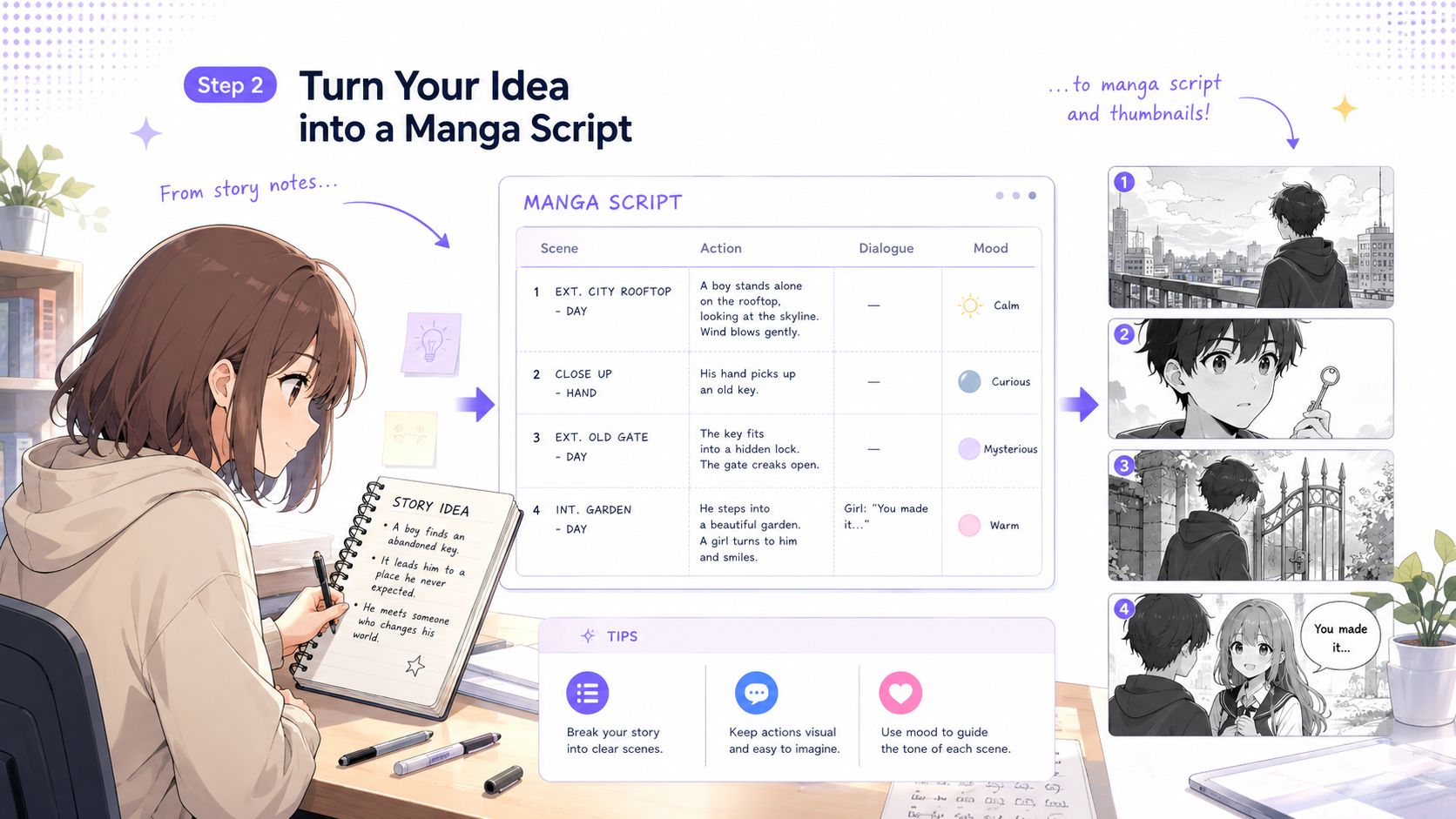
Step 2: Turn the Story into a Script
Once the story idea is clear, turn it into a script. This does not need to be a professional screenplay. It only needs to separate story actions, dialogue, and visual moments.
A simple manga script can include:
- Scene description
- Character actions
- Dialogue
- Emotional tone
- Important visual details
For example:
Scene: Classroom after sunset.
Action: The main character opens her sketchbook and notices that one drawing is glowing.
Dialogue: “Wait… did it just move?”
Mood: Quiet, mysterious, slightly magical.
This gives the AI workflow more structure. Instead of asking for a random manga image, you are telling the system what is happening and why the moment matters.
Step 3: Create Characters Before Generating Pages
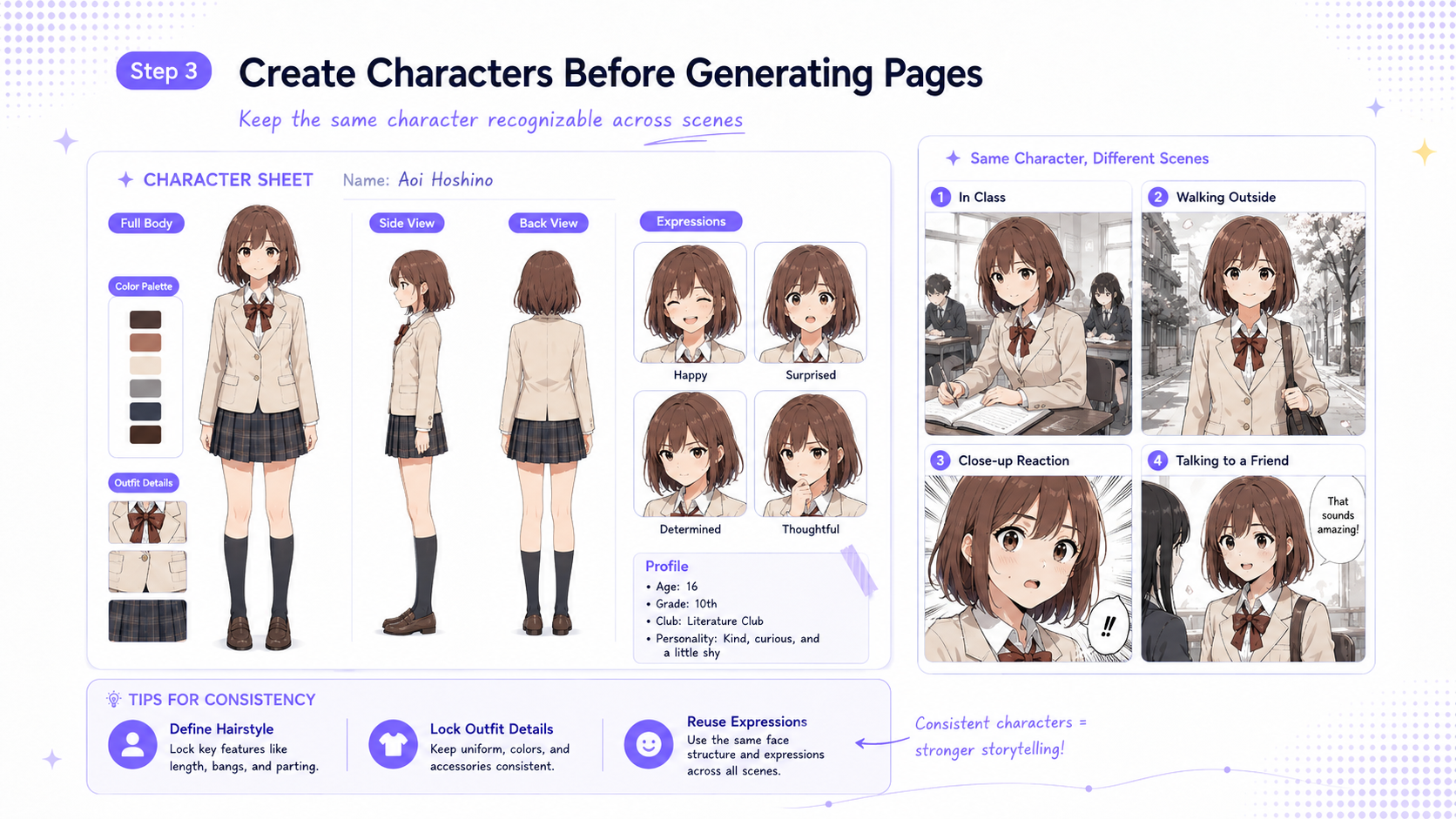
Character consistency is one of the biggest challenges in AI manga creation. If you generate every panel separately, the same character may look different from page to page.
Before creating comic panels, define your main characters first.
A useful character profile may include:
- Name
- Age or role
- Personality
- Outfit
- Hairstyle
- Facial features
- Color palette
- Key expressions
- Relationship to the story
This step is essential for manga because readers need to recognize the same character across different scenes.
Camika supports this kind of continuous creation workflow. Instead of treating each image as a separate result, creators can build character assets and reuse them across stories, scenes, and panels.
Step 4: Break the Script into Scenes
After the script and characters are ready, divide the story into scenes. A scene is a unit of action that happens in one place, time, or emotional moment.
For example, one short manga chapter could include:
- The main character walking home after school
- A strange light coming from the sketchbook
- The first creature appearing
- A surprised conversation
- A cliffhanger ending
Breaking the story into scenes helps you decide what backgrounds, camera angles, expressions, and story beats are needed.
This is where many creators get stuck. They have a story, but they do not know how to turn it into visual structure. A scene-based workflow makes the manga creation process much easier to manage.
Step 5: Convert Scenes into Manga Panels
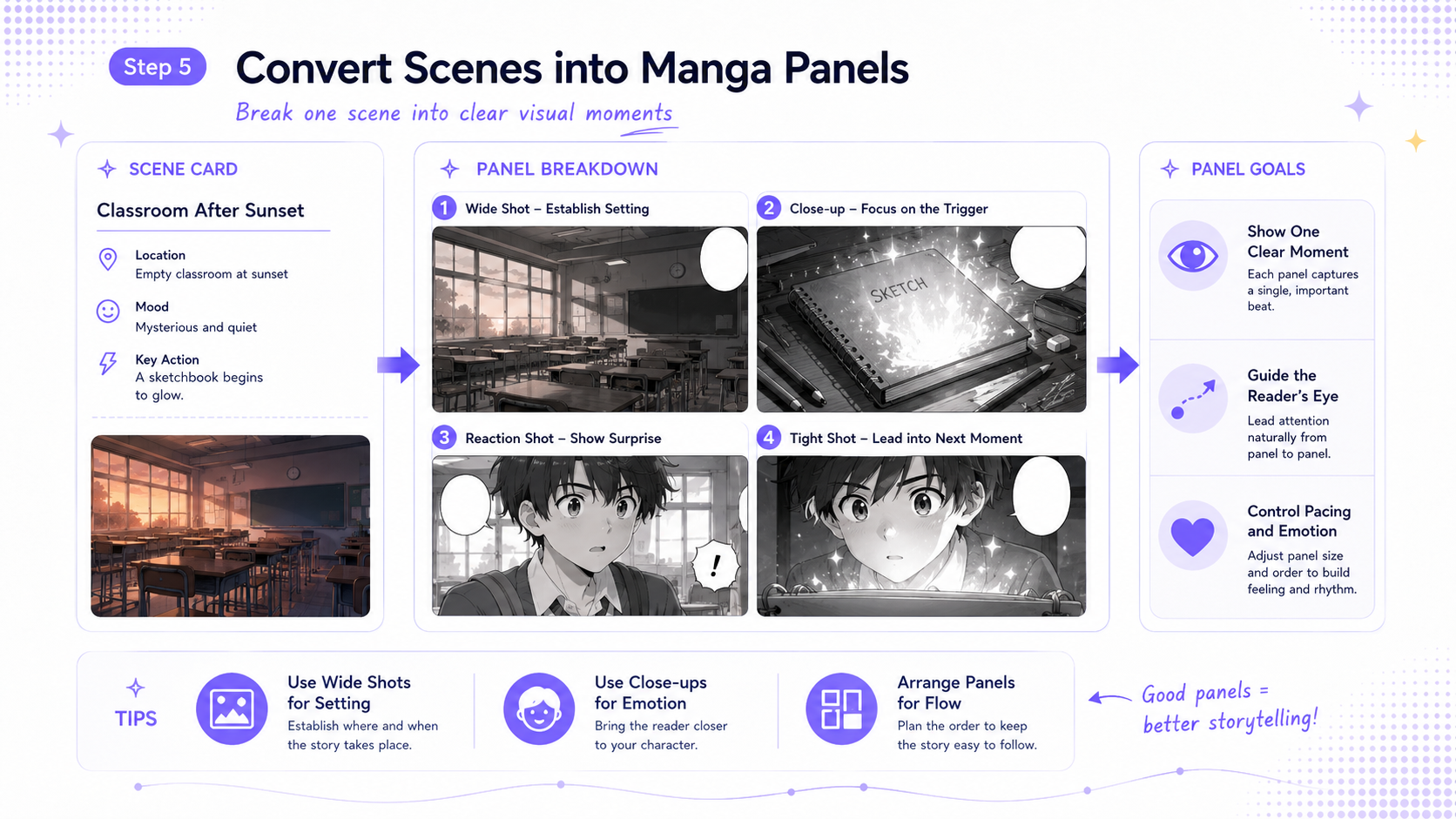
Panels are the building blocks of manga pages. Each panel should communicate one clear moment: an action, reaction, close-up, dialogue beat, or transition.
When planning manga panels, ask:
- What should the reader see first?
- Which character is speaking or reacting?
- Should this be a close-up, wide shot, or action shot?
- What emotion should the panel communicate?
- How does this panel lead to the next one?
For example, the classroom scene could become three panels:
Panel 1: A wide shot of the empty classroom at sunset.
Panel 2: A close-up of the glowing sketchbook on the desk.
Panel 3: The main character’s surprised face as a small creature climbs out of the page.
This is where AI manga becomes visual storytelling, not just image generation.
Step 6: Build the Final Comic Pages
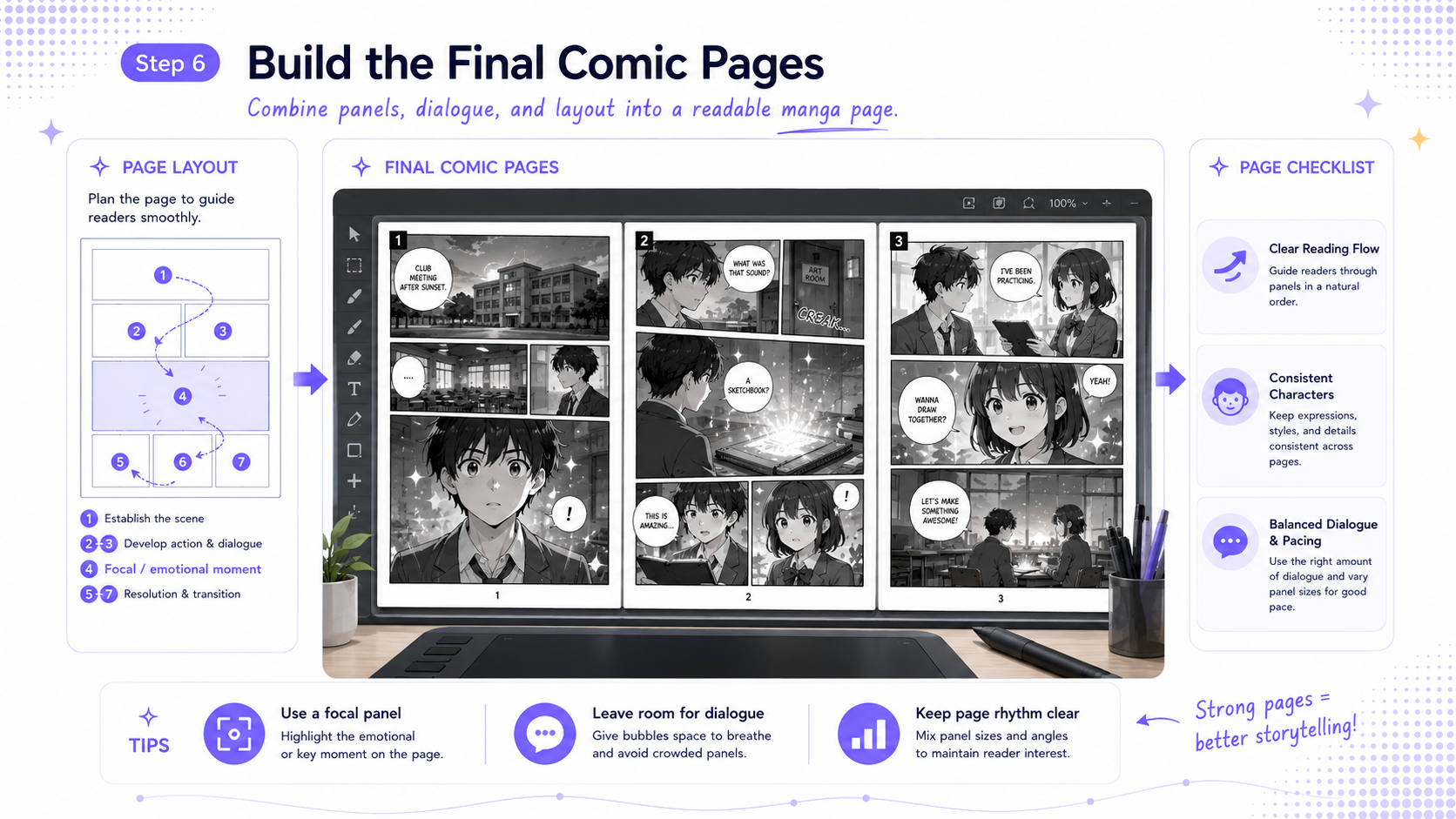
Once the panels are planned, the next step is to build comic pages. A manga page is not just a group of images. It needs reading flow, pacing, dialogue placement, and visual hierarchy.
A good comic page should answer:
- What happens on this page?
- Where should the reader’s eye move?
- Which panel is the most important?
- Does the dialogue fit naturally?
- Does the character remain visually consistent?
- Does the page make the reader want to continue?
This is why a complete workflow matters. If you only generate single images, you still need to manually solve story structure, panel continuity, character consistency, and page layout.
Camika helps creators approach manga as a full creative project: from idea to script, from characters to scenes, from panels to comic pages.
Why Camika Is More Than an AI Manga Image Generator
Many AI tools can generate a manga-style image from a prompt. But manga creation requires more than one good image. It requires a connected workflow.
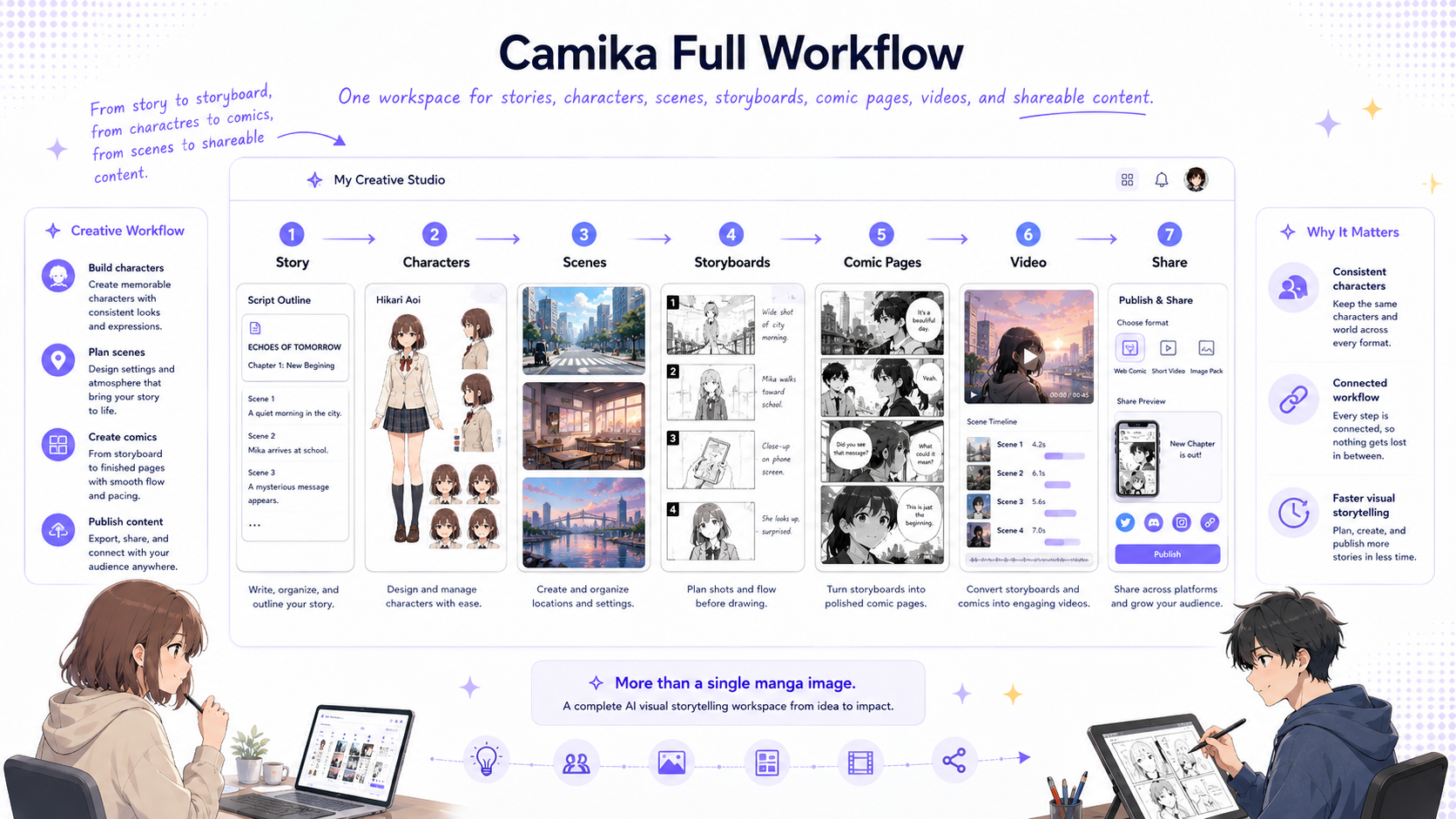
Camika is an AI visual storytelling workspace for creators who want to turn ideas into structured visual projects, including comics, manga-style short dramas, storyboards, videos, music videos, and shareable content.
For AI manga creation, this means you can think beyond a single image and work through the full chain:
Story idea → Script → Characters → Scenes → Panels → Comic pages
This is useful for beginners who do not want to manage complex prompts, model settings, and multiple disconnected tools. It is also useful for experienced creators who want to test story concepts, create visual drafts, prepare proposals, or build reusable character assets before moving into higher-cost production.
Common Mistakes When Turning a Story into AI Manga
If your AI manga pages feel inconsistent or hard to read, the issue is often not the image quality. It is usually the workflow.
Common mistakes include:
- Starting with image prompts before defining the story
- Generating characters separately on every page
- Skipping scene breakdowns
- Creating panels without knowing the page flow
- Using too much dialogue in one panel
- Treating manga as illustration instead of sequential storytelling
To avoid these problems, start with structure first. Define the story, script, characters, scenes, and panels before generating final comic pages.
The better your structure is, the easier it becomes to create manga that feels coherent, readable, and visually consistent.
Final Thoughts
Creating AI manga from a story is not only about making manga-style images. It is about transforming written ideas into visual storytelling.
The most practical workflow is:
Story idea → Script → Characters → Scenes → Panels → Comic pages
This process helps creators keep the story clear, the characters consistent, and the final pages easier to read.
Whether you are starting from a short idea, a novel chapter, a webcomic concept, or a script, a structured workflow gives your manga project a stronger foundation.
Camika helps creators move through this complete creative chain in one workspace, making it easier to turn a story into characters, scenes, panels, and shareable manga content.
Try creating your first AI manga story with Camika.
Article map
What Does It Mean to Create AI Manga from a Story?
Creating AI manga from a story means transforming written ideas into sequential visual storytelling, not just generating one illustration.
Creating AI manga from a story is the process of turning a written idea, novel, short story, or script into manga-style comic pages.
Many creators already have the most important part: a story. They may have a character idea, a fantasy world, a short script, a novel chapter, or a scene they want to visualize. The challenge is turning that written material into a readable visual sequence.
A complete AI manga workflow usually follows this path:
Story idea → Script → Characters → Scenes → Panels → Comic pages
This workflow matters because manga is not just about visual style. A manga page needs continuity, pacing, character consistency, dialogue placement, and panel flow. If you only generate one image at a time, the result may look good as a single picture but feel disconnected as a story.
That is why AI manga creation needs more than a simple image generator. It needs a structured creative process.
Step 1: Start with a Clear Story Idea
A clear story idea gives your AI manga project a direction before you create scripts, characters, and panels.
Every manga project starts with a story idea. It can be a one-sentence concept, a short plot, a complete novel chapter, or a script.
Before generating visuals, define the basics:
Who is the main character?
What does the character want?
What problem or conflict appears?
What is the emotional tone?
What kind of manga style fits the story?
For example:
“A shy high school student discovers that her sketchbook can bring imaginary creatures into the real world.”
This simple idea already gives the manga a main character, a magical concept, a visual object, and a story hook. From there, you can expand it into scenes, dialogue, and panels.
The clearer the story idea is, the easier it becomes to create manga pages that feel connected.
Step 2: Turn the Story into a Script
A script helps separate scene descriptions, actions, dialogue, and mood before image generation begins.
Once the story idea is clear, turn it into a script. This does not need to be a professional screenplay. It only needs to describe what happens in each story beat.
A simple manga script can include:
Scene description
Character actions
Dialogue
Mood
Important visual details
For example:
Scene: Classroom after sunset.
Action: The main character opens her sketchbook and notices that one drawing is glowing.
Dialogue: “Wait… did it just move?”
Mood: Quiet, mysterious, slightly magical.
This structure gives the AI manga workflow more useful information. Instead of asking for a random manga image, you are defining what happens, who is involved, where the scene takes place, and what emotion the panel should communicate.
A script also makes the next steps easier: character setup, scene planning, panel breakdown, and page layout.
Step 3: Create Characters Before Generating Pages
Character setup is essential for keeping the same hero recognizable across multiple scenes and pages.
Character consistency is one of the biggest challenges in AI manga creation. If you generate every panel separately, the same character may look different from page to page.
Before creating comic panels, define your main characters first.
A useful character profile may include:
Name
Age or role
Personality
Outfit
Hairstyle
Facial features
Color palette
Key expressions
Relationship to the story
This step is especially important for manga because readers need to recognize the same character across different scenes, emotions, and camera angles.
Camika supports this kind of continuous creative workflow. Creators can think of characters as reusable story assets instead of one-time images. This makes the process more suitable for comics, manga-style short dramas, storyboards, and long-form visual projects.
Step 4: Break the Script into Scenes
Scene breakdowns help organize the story visually before it becomes individual panels and pages.
After the script and characters are ready, divide the story into scenes. A scene is a unit of action that usually happens in one place, time, or emotional moment.
For example, one short manga chapter could include:
The main character walking home after school
A strange light coming from the sketchbook
The first creature appearing
A surprised conversation
A cliffhanger ending
Breaking the story into scenes helps you decide what locations, backgrounds, emotions, and story beats are needed.
This is where many creators get stuck. They have a story, but they do not know how to turn it into visual structure. A scene-based workflow makes manga creation easier to manage because each scene can later become a set of panels.
In Camika, this kind of workflow helps creators move from written content to structured visual planning instead of jumping directly from a prompt to a final image.
Step 5: Convert Scenes into Manga Panels
Panels turn each scene into readable visual moments with composition, emotion, and pacing.
Panels are the building blocks of manga pages. Each panel should communicate one clear moment: an action, reaction, close-up, dialogue beat, or transition.
When planning manga panels, ask:
What should the reader see first?
Which character is speaking or reacting?
Should this be a close-up, wide shot, or action shot?
What emotion should the panel communicate?
How does this panel lead to the next one?
For example, the classroom scene could become three panels:
Panel 1: A wide shot of the empty classroom at sunset.
Panel 2: A close-up of the glowing sketchbook on the desk.
Panel 3: The main character’s surprised face as a small creature climbs out of the page.
This is where AI manga becomes visual storytelling, not just image generation.
Step 6: Build the Final Comic Pages
The final page combines panels, dialogue, layout, and visual continuity into readable manga.
Once the panels are planned, the next step is to build comic pages. A manga page is not just a group of images. It needs reading flow, pacing, dialogue placement, and visual hierarchy.
A good comic page should answer:
What happens on this page?
Where should the reader’s eye move?
Which panel is the most important?
Does the dialogue fit naturally?
Does the character remain visually consistent?
Does the page make the reader want to continue?
This is why a complete workflow matters. If you only generate single images, you still need to solve story structure, panel continuity, character consistency, and page layout separately.
Camika helps creators approach manga as a complete creative project: from idea to script, from characters to scenes, from panels to comic pages.
Why Camika Is More Than an AI Manga Image Generator
Camika focuses on the full manga creation chain instead of only producing one manga-style image.
Many AI tools can generate a manga-style image from a prompt. But manga creation requires more than one good image. It requires a connected workflow.
Camika is an AI visual storytelling workspace for creators who want to turn ideas into structured visual projects, including comics, manga-style short dramas, storyboards, videos, music videos, and shareable content.
For AI manga creation, this means you can work through the full chain:
Story idea → Script → Characters → Scenes → Panels → Comic pages
This is useful for beginners who do not want to manage complex prompts, model settings, and multiple disconnected tools. It is also useful for experienced creators who want to test story concepts, create visual drafts, prepare proposals, or build reusable character assets before moving into higher-cost production.
Camika is not only about generating an image. It helps creators turn a story into a visual project.
Common Mistakes When Turning a Story into AI Manga
Most AI manga problems come from skipping structure and generating final images too early.
If your AI manga pages feel inconsistent or hard to read, the issue is often not image quality. It is usually the workflow.
Common mistakes include:
Starting with image prompts before defining the story
Generating characters separately on every page
Skipping scene breakdowns
Creating panels without knowing the page flow
Using too much dialogue in one panel
Treating manga as illustration instead of sequential storytelling
To avoid these problems, start with structure first. Define the story, script, characters, scenes, and panels before generating final comic pages.
The better your structure is, the easier it becomes to create manga that feels coherent, readable, and visually consistent.
Final Thoughts
The best way to create AI manga from a story is to follow a complete creative workflow.
Creating AI manga from a story is not only about making manga-style images. It is about transforming written ideas into visual storytelling.
The most practical workflow is:
Story idea → Script → Characters → Scenes → Panels → Comic pages
This process helps creators keep the story clear, the characters consistent, and the final pages easier to read.
Whether you are starting from a short idea, a novel chapter, a webcomic concept, or a script, a structured workflow gives your manga project a stronger foundation.
Camika helps creators move through this complete creative chain in one workspace, making it easier to turn a story into characters, scenes, panels, and shareable manga content.
CTA:
Try creating your first AI manga story with Camika.
Key data
- Core AI manga workflow stages
- 6 stages: story idea, script, characters, scenes, panels, comic pages Source: Camika editorial workflow framework · 2026
- Editorial notes for this article
- 5 Q&A items Source: Camika Blog GEO publishing format · 2026
- Editorial notes for this article
- 1 cover image plus 6 in-article images Source: Camika Blog image plan · 2026
Where Camika fits
- Step 3: Create Characters Before Generating Pages Camika supports this kind of continuous creative workflow. Creators can think of characters as reusable story assets instead of one-time images. Users struggle with character inconsistency when generating multiple manga pages separately.
- Step 4: Break the Script into Scenes In Camika, this kind of workflow helps creators move from written content to structured visual planning instead of jumping directly from a prompt to a final image. Users have stories or scripts but do not know how to turn them into scenes, panels, and manga pages.
- Step 6: Build the Final Comic Pages Camika helps creators approach manga as a complete creative project: from idea to script, from characters to scenes, from panels to comic pages. Users need a full manga workflow, not only isolated image generation.
- Why Camika Is More Than an AI Manga Image Generator Camika is an AI visual storytelling workspace for creators who want to turn ideas into structured visual projects, including comics, manga-style short dramas, storyboards, videos, music videos, and shareable content. Users compare AI tools by image quality, but manga creation also requires continuity, workflow, and reusable creative assets.
- Final Thoughts Camika helps creators move through this complete creative chain in one workspace, making it easier to turn a story into characters, scenes, panels, and shareable manga content. Users want to turn a story, novel, or script into publishable visual content but do not want to stitch together many disconnected AI tools.
FAQ
Can I turn a written story into manga with AI?
Yes. You can turn a written story into AI manga by converting it into a script, creating characters, breaking the script into scenes, planning panels, and assembling final comic pages. A structured workflow usually works better than generating random images one by one.
What is the best workflow for creating AI manga from a story?
A practical AI manga workflow is: story idea, script, characters, scenes, panels, and comic pages. This structure helps keep the story organized and makes it easier to maintain character and style consistency.
Is an AI manga generator enough to create a full comic?
A basic AI manga generator may create individual images, but a full comic also needs story structure, character consistency, scene planning, panel flow, dialogue, and page layout. A complete creative workflow is more useful for long-form manga creation.
Can beginners create manga from a story with Camika?
Yes. Camika is designed to lower the production barrier for creators who may not know complex prompts, model settings, or editing tools. Users can start with a story idea and follow a workflow toward characters, panels, and comic pages.
Can professional creators use AI manga tools?
Yes. Professional creators can use AI manga workflows for early concept validation, visual drafts, storyboarding, character asset development, and proposal preparation before moving into higher-cost production.